
Loki AI tutor
Meet the most interactive AI tutor
Loki is an AI tutor and AI study helper built around your course. Ask it to explain a difficult idea or connect topics across your course. It asks which sections you mean when it isn't clear. When something has steps, it draws it out as a mini video while it explains. It can also show figures from your slides, a diagram it draws, a 3D model you can turn, code running step by step, or a chart you can change. On Pro, you can also talk by voice or ask it to make files.
- Answers from your course
- Mini videos, 3D models and code
- Voice calls and actions on Pro
- Free to start
What Loki can do
The same four kinds of help you see when you open Loki in your course.
Explain
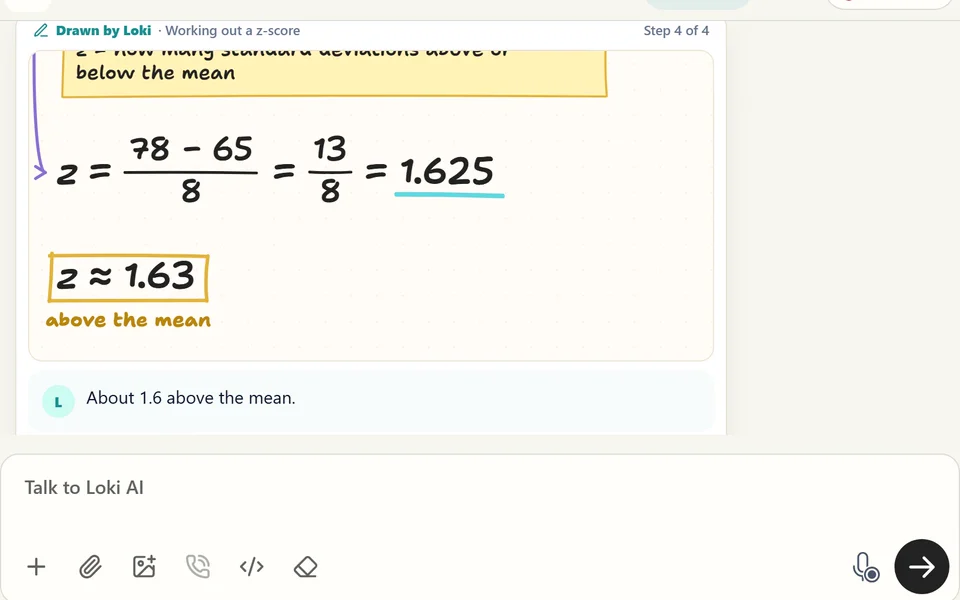
- Draws it out as a mini video: maths methods, processes and worked examples open full screen and are drawn step by step in Loki's voice, with captions, when you type and when you call.
- Ask in the middle of a mini video: Loki rubs out the part you didn't follow and shows it another way, such as an example.
- Shows figures from your own slides, diagrams it draws, and illustrations when you ask for a picture.
- Shows it in 3D when that teaches best: turn a heart, the brain or the skeleton, a molecule, a protein, DNA, a planet or a museum object, and tap its parts to see their names.
- Runs code step by step in coding courses: watch an algorithm such as binary search or a sort run line by line, with its values changing.
- Charts you can change for statistics and economics: shade a probability on a normal or binomial curve, or add a tax to a market and watch the price and the losses move.
Practise
- Quizzes you one question at a time, or writes multiple choice questions from your sections.
- “Show the working” on a practice answer draws out the full solution, step by step.
CreatePro
- Editable PowerPoint decks from the sections you choose.
- Excel formula booklets and practice workbooks.
- Revision plans with a calendar file.
- Loki shows what it will make and waits for your yes.
TalkPro
- Voice calls where Loki explains out loud while it draws.
- Ask it to draw it out or show you the diagram as you talk.
See what Loki can show you
Real answers from Loki on sample questions. Pick one, then turn it, tap it or play it.
Show me the heart in 3D

Here is the heart. Turn it with your finger or mouse and tap any part to see its name: the four chambers, the valves and the big vessels. The valves are lit up.
How it works
Select a step to see what happens in it.
- Your course material, organised by week or section.
- A question, in your own words.
- The sections Loki should use, or let it ask you.
Example with sample content
Try it
Pick a question and see how an answer points back to the course section it came from.
This example runs in your browser on made-up course content. It does not use your data or AI.
The example loads as you scroll.
What you add, what you get
You add
- Your course material, organised by week or section.
- A question, in your own words.
- The sections Loki should use, or let it ask you.
You get
- Answers built from your own course, not the open internet.
- Explanations, examples and connections across the sections you choose.
- Step-by-step explanations for maths working and processes, drawn out as Loki explains.
- Figures from your own slides, diagrams Loki draws, and illustrations when you ask for a picture.
- On Pro: voice calls with Loki, where it explains out loud while it draws.
- On Pro: editable PowerPoint decks, Excel workbooks and revision plans with a calendar file, made only after you confirm.
What makes it different
- Grounded in your courseLoki answers from your course, so answers match what you were taught.
- Mini videos that draw it outWhen something has steps, like maths working or a process, Loki makes a mini video: it draws it out full screen, one step at a time, in its own voice with captions (one tap mutes it). Ask in the middle and it rubs out what didn't land and shows it another way.
- Shows you, not just tells youFigures from your own slides, diagrams Loki draws, 3D models you can turn, code you can step through, charts you can change, and illustrations when you ask for a picture.
- Asks before it createsLoki shows what it will make and from which sections, and waits for your yes.
- Files you can useFormula banks, practice sheets and grade trackers in Excel, slide decks in PowerPoint, and revision plans for your calendar.
- Safe by designLoki stays on your course and declines inappropriate requests.
Examo vs a general AI chat
| Topic | Examo | A general AI chat |
|---|---|---|
| Where answers come from | Your own course, from the sections you choose. | Its general training and whatever you paste in. |
| When a question is unclear | Loki asks which sections you mean. | It answers with the context it has. |
| Your course | Kept with your course, week by week. | Added again in each new conversation. |
Examo as it works today. General AI chat apps differ, and many can do more with careful prompts.
Good to know
- Free includes 10 Loki messages a day in most countries. Pro removes the daily cap, within fair monthly limits.
- Voice calls and file-making actions are part of Pro.
- Voice and pictures use your monthly allowance.
- Loki can make mistakes. Check important facts against your course material.
Plans
Free includes Loki text tutoring within daily limits. Pro adds voice calls, file-making actions and more messages. Plans in the FAQ.
Start for freeQuestions
What is an AI study helper?
An AI study helper explains ideas and helps you work through questions while you study. Loki works from your Examo course, so you can ask about your own material rather than paste it into a new chat each time. Check important answers against your sources.
Does Loki use my own notes?
Yes. Loki answers course questions from your own course material, using the sections you select.
Can Loki make PowerPoint slides?
On Pro, yes. Loki proposes an editable deck from your selected sections, shows what it will make, and makes it after you confirm.
Can Loki draw things out or show diagrams?
Yes. When something has steps, Loki makes a mini video that draws it out as it explains, full screen, in its own voice with captions, and you can type a question in the middle. It can also show figures from your slides, draw diagrams, and make an illustration when you ask for a picture.
Can Loki show things in 3D or run code?
Yes. Loki can show a 3D model you turn and tap, such as the heart, a molecule, a protein, DNA or a planet. In coding courses it runs an algorithm step by step so you can watch each line and value change, and for statistics and economics it shows charts you can change.
Can I talk to Loki?
On Pro you can call Loki by voice. Loki explains out loud and draws it out as it talks.
Is Loki free?
Yes. Loki text tutoring is free within daily limits, and no card is needed.
Works with the rest of your course
- AI explainer video generatorA short narrated lesson for any section of your course.
- AI practice question generatorQuestions built on your exam's patterns, with marked written answers.
- AI presentation makerEditable slide decks from a topic, notes or a document.
Compare the best AI study tools by task
Comparing study apps? Read our guide to the best AI for studying, or see every Examo study tool.
Start for free