Cheat Sheets
One-page revision sheets for every section
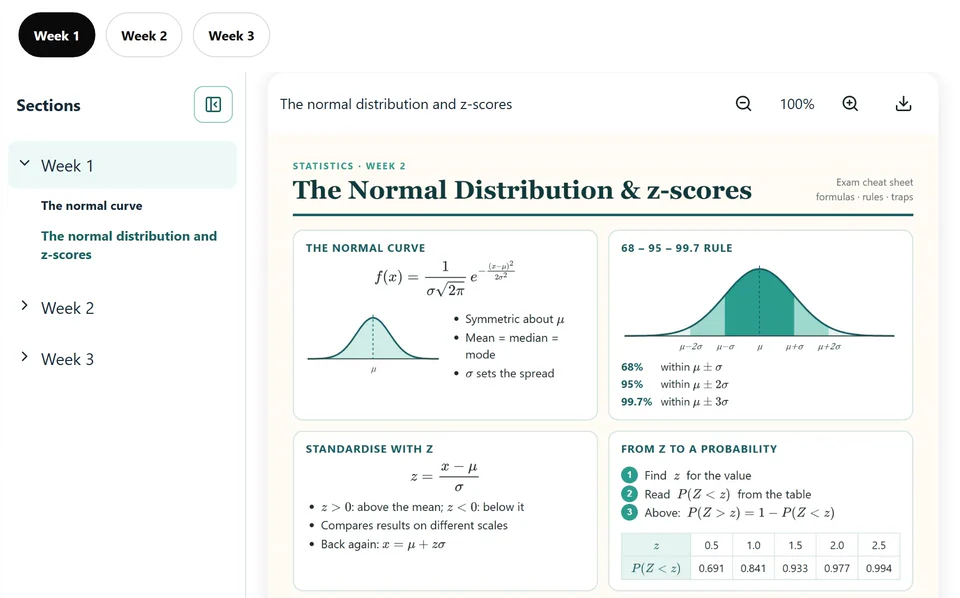
Examo's cheat sheet maker condenses each section of your course into one visual sheet, with the key ideas, definitions and formulas in clear boxes, ready to download.
- One sheet per section
- Download as an image
- Free to start
How it works
Select a step to see what happens in it.
- Course material for each week or section.
- The section you want a sheet for.
- Nothing to lay out: Examo designs the sheet.
Example with sample content
Try it
Zoom in on part of a sheet and switch between its boxes.
This example runs in your browser on made-up course content. It does not use your data or AI.
The example loads as you scroll.
What you add, what you get
You add
- Course material for each week or section.
- The section you want a sheet for.
- Nothing to lay out: Examo designs the sheet.
You get
- A portrait, A4-shaped revision sheet.
- Key definitions and formulas in callout boxes.
- Zoom from 50% to 200% to read it in the app.
- A PNG download with a small Examo mark.
What makes it different
- Visual, not a wall of textIdeas, definitions and formulas sit in boxes you can scan in seconds.
- One per sectionEach sheet covers one part of your course, so it stays readable.
- Made from your courseSheets come from the same course material as your practice, flashcards and maps.
Examo vs a general AI chat
| Topic | Examo | A general AI chat |
|---|---|---|
| Format | A one-page, A4-shaped visual sheet per section. | Text you format into a sheet yourself. |
| Source | The same course material as your practice, flashcards and maps. | Whatever you paste in. |
| Using it | Zoom from 50% to 200%, or download a PNG to print. | Copy it into a document and lay it out. |
Examo as it works today. General AI chat apps differ, and many can do more with careful prompts.
Good to know
- The sheet is an image, so you can't edit its text.
- Downloads are PNG images; there is no PDF export.
- Check formulas and numbers against your course material; generated images can contain mistakes.
Plans
On your own courses, every section is available on Free within a monthly allowance. On courses shared with you, Free covers 2 sample sections; Pro opens them all and raises the limits. Plans in the FAQ.
Start for freeQuestions
Can I print an Examo cheat sheet?
Yes. Download the PNG and print it; it is laid out as a portrait A4 sheet.
Can I edit the cheat sheet?
No. The sheet is an image. You can make a new one after changing the section's material.
Is the cheat sheet maker free?
Yes. The cheat sheet maker is free within monthly limits, and no card is needed. Pro raises the limits.
Works with the rest of your course
- AI summary generatorStructured summaries of lectures, slides, PDFs and books.
- AI study notesCornell-style notes you cover and recall, with 5 review questions.
- AI flashcard generatorDecks for each section, with spaced-repetition review and a test mode.
Comparing study apps? Read our guide to the best AI for studying, or see every Examo study tool.
Start for free